 Oats Blog
Pocket Dimensions Tech Experiment
Pocket dimension experiment, made in UE5.
Above you'll see an interesting experiment I made where the player can summon a doorway to a pocket dimension. Unlike many other space-warping effects like portals, these pocket dimensions do not involve any teleportation or far-off render targets - the pocket dimension actually does occupy the space behind wherever it's placed, even though it doesn't appear so. It does so by masking areas inside and outside the pocket for visibility, and flipping collision when the player enters and exits.
In the rest of this post I'll loosely break down how it's done and pose some ideas for expanding on this tech.
Creating the Doorway Mask
The crux of this effect is masking parts of the scene outside the pocket vs inside the pocket, and to do that we need a screen-space texture that can tell our materials when to make themselves transparent.
The white areas of the render texture mask where the inside of the pocket is, black areas are outside.
To get the inside-vs-outside mask I used a scene capture component mimicking the player camera, and placed a post process material on it that would make it render only a black and white mask of only the pocket dimension doorway. I placed invisible planes with custom depth enabled on the pocket doorway, and the post process material is designed to identify those planes and ignore everything else.

Scene capture component copies player camera location, rotation, and FoV on tick.
Apologies if the images are small. You can open them in a new tab for a closer look, I haven't figured out the html to let you inspect them closer.

Scene capture component uses a special post process material to render a mask.

The post process material only renders objects with customdepth stencil = 2 or 3. When outside the pocket, customdepth 2 mesh represents the doorway in, and when inside the pocket customdepth 3 mesh represents the doorway out.

Invisible planes are placed in the doorway. The in-plane has customdepth 2, the out-plane has customdepth 3, and the hiddenback plane prevents some glitchiness while circling around the pocket.

The planes use this special material to be both completely transparent but still render to custom depth pass.
Masking out Materials
Now that the mask is working, we need our materials to respect it. For this effect to work all of the materials in the pocket, and any that might overlap a pocket, need to have masked or transparent opacity. I've made a pocket dimension master material to speed this up, where instances can either mask themselves to show inside the pocket or out.

On white parts of the mask materials labeled as inside the pocket will be opaque and outside materials will be transparent, and vice versa where the mask is black.
Our doorway now acts like a window that lets us see different things inside, but you'll notice if you walk through it the effect doesn't persist. We'll need to write a script that inverts the mask when our camera passes through the window.

This script runs when the player's camera overlaps the doorway. Since this is third person, I have another script which attaches a sphere with overlap collision to the camera to give it collision.
Finally, our pocket doorway reveals and hides objects as intended!
Collision and Lighting
Notably even though our pocket dimension doorway reveals a different space inside, entering the pocket has us colliding with the same objects as outside - and our invisible room is very much tangible on the outside! An overlap volume, a bit of scripting, and tagging objects as being 'inside' or 'outside' the pocket should help us clear this collision issue.
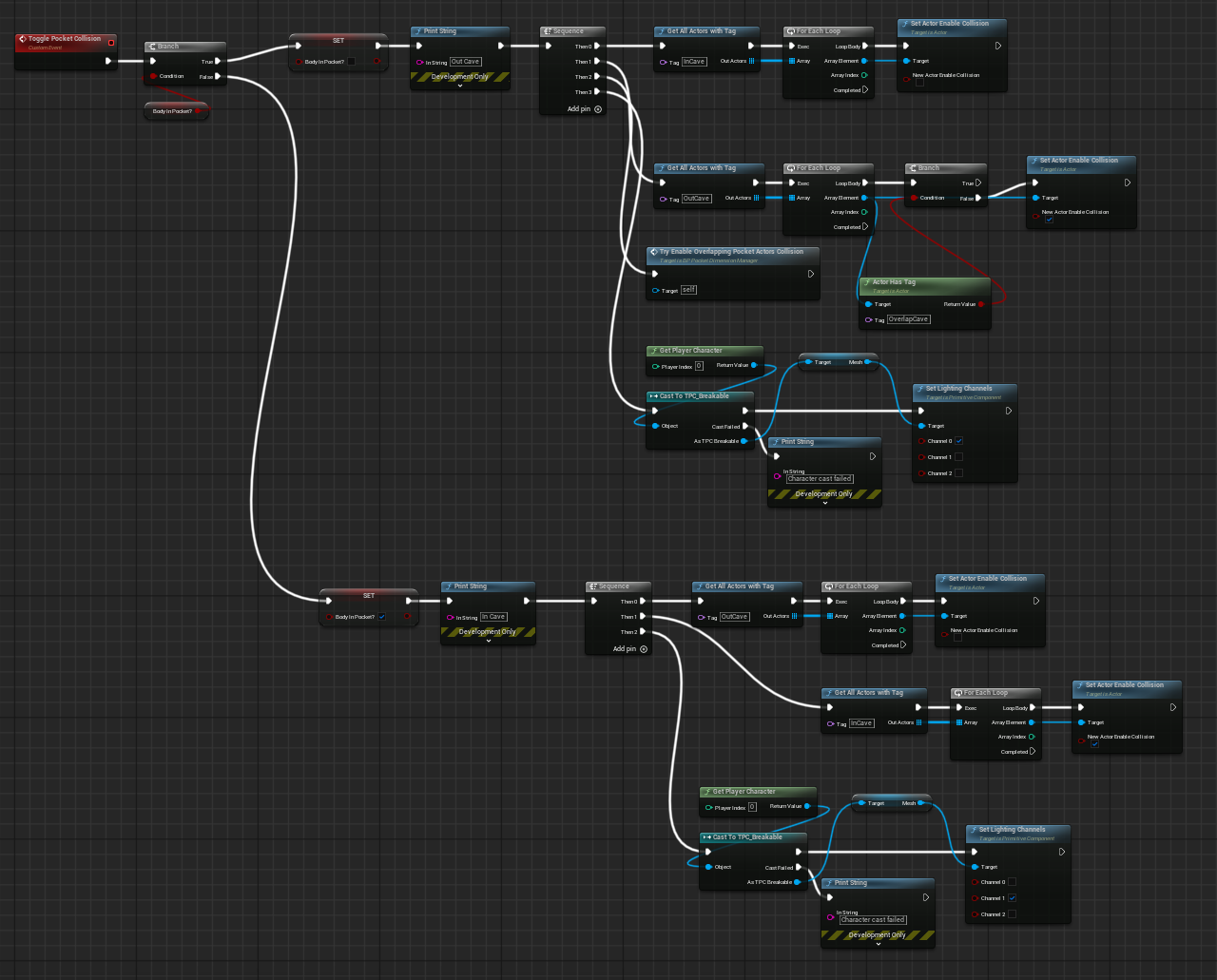
When the player's body enters the doorway, all objects inside the pocket gain collision and all objects outside lose collision - the reverse happens when you exit.
You might notice that the lighting is a bit funky. Ideally the inside of our pocket doesn't receive the light of the outside world and can have its own lights inside. We can use lighting channels to fix this.

Everything inside the pocket uses lighting channel 1, and everything outside uses channel 0. Also seen in the previous image, we switch the player's body from channel 0 to 1 when they enter.
Improvements
These pockets require a lot of setup, so here are some improvements I made to help with creating and managing them:
In the initial demonstration, I let the player place and summon a pocket at will. I'm not gonna go into the placement system but I do summon/unsummon the pockets at runtime. To do this easily I made the pocket scene a level instance, and I use a pocket manager blueprint to manage the placement and loading/unloading of pockets (and the player state relative to pockets too). This means I only have to load 1 thing (a level) when the pocket is summoned, and it is easy for me to edit pocket dimensions by opening their level asset.
Given more time I would write some scripts that quickly unhide all of the materials in the pocket dimension level for easier editing, and do automatic tagging and light channel assignment.
For the keen graphics programmers out there, there are probably more performant ways of generating the pocket visibility mask. I'm sure using a whole scene capture just to generate a black and white mask is not great.
Further Possibilities
There are lots of ways you can flavor this tech, and I'd be excited to see people expand on it. Here are a few ideas:
Environment-dependent pockets: This is an idea I've been pursuing a bit, where the surface that you place the pocket on changes the environment inside. It's easy to do by assigning your pocket-surfaces different physical materials and then checking the physical material with your placement raycast. The biome of the pocket interior can change based on surface material.
In a similar vein, you can have variations of the pocket based on horizontal, vertical, or angled placement. Maybe if the pocket is placed on the ceiling a ladder could drop dow or if placed on a slope it could form a path down through the earth.
Seamless non-euclidean travel: Combining pocket dimensions with a bit of sneaky teleporting could let the player seamlessly travel long distances unusally quick. Just make the pocket dimesnion a corridor with a few bends, at some point in the corridor teleport the player to an identical version far away, and then mysteriously they will exit the pocket someplace far away. You don't need pockets to do this, but I think having the player place down the entrace would help sell the effect.
A really confusing maze: You could make a very confusing maze that overlaps itself and lets you take 4 90 degree turns in a row. It would be quite evil.